As of May 10th 2017,
Azure Cosmos DB is Microsoft’s globally distributed multi-model database. Azure Cosmos DB was built from the ground up with global distribution and horizontal scale at its core. It offers turnkey global distribution across any number of Azure regions by transparently scaling and replicating your data wherever your users are. Elastically scale throughput and storage worldwide, and pay only for the throughput and storage you need. Azure Cosmos DB guarantees single-digit-millisecond latencies at the 99th percentile anywhere in the world, offers multiple well-defined consistency models to fine-tune performance, and guarantees high availability with multi-homing capabilities—all backed by industry leading service level agreements (SLAs).
Azure Cosmos DB is truly schema-agnostic; it automatically indexes all the data without requiring you to deal with schema and index management. It’s also multi-model, natively supporting document, key-value, graph, and column-family data models. With Azure Cosmos DB, you can access your data using APIs of your choice, as DocumentDB SQL (document), MongoDB (document), Azure Table Storage (key-value), and Gremlin (graph) are all natively supported.
Most mobile apps need to store data in the cloud, and Azure DocumentDB is an awesome cloud database for mobile apps. It has everything a mobile developer needs, a fully managed NoSQL database as a service that scales on demand, and can bring your data where your users go around the globe — completely transparently to your application. Today we are excited to announce Azure DocumentDB SDK for Xamarin mobile platform, enabling mobile apps to interact directly with DocumentDB, without a middle-tier.
Here is what mobile developers get out of the box with DocumentDB:
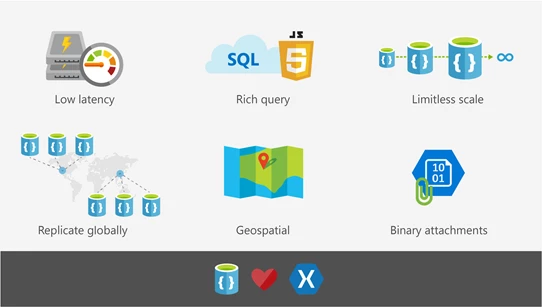
- Rich queries over schemaless data. DocumentDB stores data as schemaless JSON documents in heterogeneous collections, and offers rich and fast queries without the need to worry about schema or indexes.
- Fast. Guaranteed. It takes only few milliseconds to read and write documents with DocumentDB. Developers can specify the throughput they need and DocumentDB will honor it with 99.99% SLA.
- Limitless Scale. Your DocumentDB collections will grow as your app grows. You can start with small data size and 100s requests per second and grow to arbitrarily large, 10s and 100s of millions requests per second throughput, and petabytes of data.
- Globally Distributed. Your mobile app users are on the go, often across the world. DocumentDB is a globally distributed database, and with just one click on a map it will bring the data wherever your users are.
- Built-in rich authorization. With DocumentDB you can easy to implement popular patterns like per-user data, or multi-user shared data without custom complex authorization code.
- Geo-spatial queries. Many mobile apps offer geo-contextual experiences today. With the first class support for geo-spatial types DocumentDB makes these experiences very easy to accomplish.
- Binary attachments. Your app data often includes binary blobs. Native support for attachments makes it easier to use DocumentDB as one-stop shop for your app data.
Let’s build an app together!
Step #1. Get Started
It’s easy to get started with DocumentDB, just go to Azure portal, create a new DocumentDB account, go to the Quickstart tab, and download a Xamarin Forms todo list sample, already connected to your DocumentDB account.
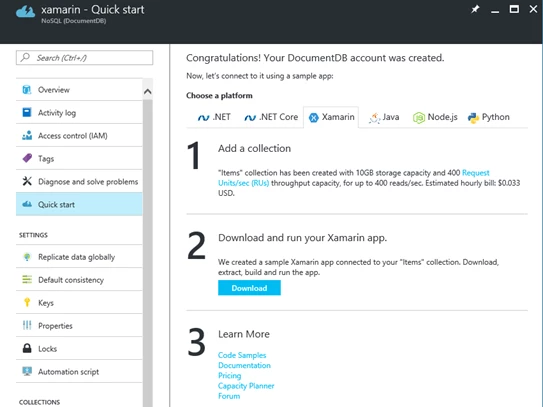
Or if you have an existing Xamarin app, you can just add this DocumentDB NuGet package. Today we support Xamarin.IOS, Xamarin.Android, as well as Xamarin Forms shared libraries.
Step #2. Work with data
Your data records are stored in DocumentDB as schemaless JSON documents in heterogeneous collections. You can store documents with different structures in the same collection.

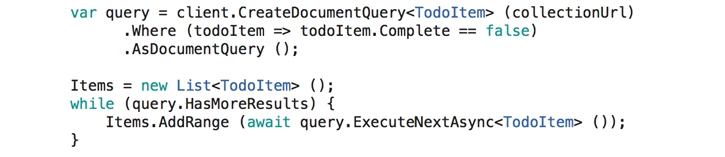
In your Xamarin projects you can use language integtated queries over schemaless data:
Step #3. Add Users
Like many get started samples, the DocumentDB sample you downloaded above authenticates to the service using master key hardcoded in the app’s code. This is of course not a good idea for an app you intend to run anywhere except your local emulator. If an attacker gets a hold of the master key, all the data across your DocumentDB account is compromised.
Instead we want our app to only have access to the records for the logged in user. DocumentDB allows developers to grant application read or read/write access to all documents in a collection, a set of documents, or a specific document, depending on the needs.
Here is for example, how to modify our todo list app into a multi-user todolist app, a complete version of the sample is available here:
- Add Login to your app, using Facebook, Active Directory or any other provider.
- Create a DocumentDB UserItems collection with /userId as a partition key. Specifying partition key for your collection allows DocumentDB to scale infinitely as the number of our app users growth, while offering fast queries.
- Add DocumentDB Resource Token Broker, a simple Web API that authenticates the users and issues short lived tokens to the logged in users with access only to the documents within the user’s partition. In this example we host Resource Token Broker in App Service.
- Modify the app to authenticate to Resource Token Broker with Facebook and request the resource tokens for the logged in Facebook user, then access users data in the UserItems collection.
This diagram illustrates the solution. We are investigating eliminating the need for Resource Token Broker by supporting OAuth in DocumentDB first class, please upvote this uservoice item if you think it’s a good idea!
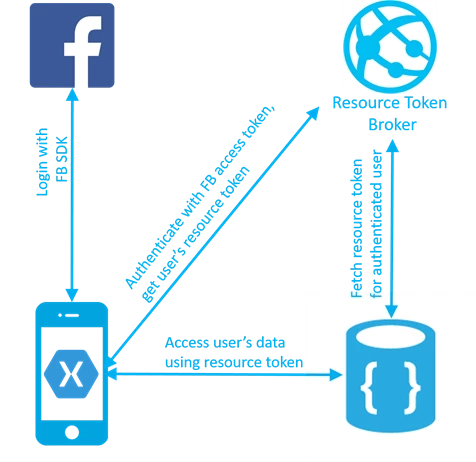
Now if we want two users get access to the same todolist, we just add additional permissions to the access token in Resource Token Broker. You can find the complete sample here.
Step #4. Scale on demand.
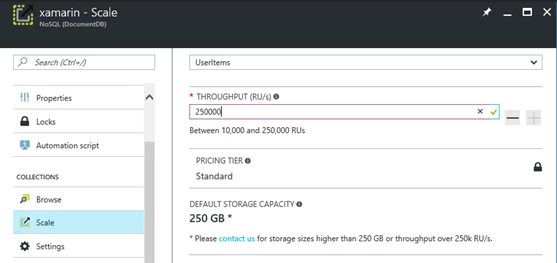
DocumentDB is a managed database as a service. As your user base grows, you don’t need to worry about provisioning VMs or increasing cores. All you need to tell DocumentDB is how many operations per second (throughput) your app needs. You can specify the throughput via portal Scale tab using a measure of throughput called Request Units per second (RUs). For example, a read operation on a 1KB document requires 1 RU. You can also add alerts for “Throughput” metric to monitor the traffic growth and programmatically change the throughput as alerts fire.
Step #5. Go Planet Scale!
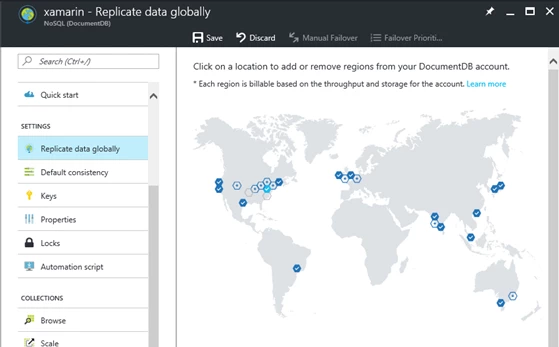
As your app gains popularity, you may acquire users accross the globe. Or may be you just don’t want to be caught of guard if a meteorite strkes the Azure data centers where you created your DocumentDB collection. Go to Azure portal, your DocumentDB account, and with a click on a map, make your data continuously replicate to any number of regions accross the world. This ensures your data is available whereever your users are, and you can add failover policies to be prepared for the rainy day.
We hope you find this blog and samples useful to take advantage of DocumentDB in your Xamarin application. Similar pattern can be used in Cordova apps using DocumentDB JavaScript SDK, as well as native iOS / Android apps using DocumentDB REST APIs.
As always, let us know how we are doing and what improvements you’d like to see going forward for DocumentDB through UserVoice, StackOverflow #azure-documentdb, or Twitter @DocumentDB.