
Azure Monitor alerts provides rich alerting capabilities on a variety of telemetry such as metrics, logs, and activity logs. Over the past year, we have unified the alerting experience by providing a common consumption experience including UX and API for alerts. However, the payload format for alerts remained different which puts the burden of building and maintaining multiple integrations, one for each alert type based on telemetry, on the user. Today, we are releasing a new common alert schema that provides a single extensible format for all alert types.
What’s the common alert schema?
With the common alert schema, all alert payloads generated by Azure Monitor will have a consistent structure. Any alert instance describes the resource that was affected and the cause of the alert, and these are described in the common schema in the following sections:
- Essentials: A set of standardized fields which are common across all alert types. It describes what resource the alert is on, along with additional common alert metadata such as severity or description.
- Alert context: A set of fields which describe the cause of the alert details that vary based on the alert type. For example, a metric alert would have fields like the metric name and metric value in the alert context, whereas an activity log alert would have information about the event that generated the alert.
How does it help me?
The typical workflow we hear from customers – both ITOps and DevOps teams – is that alerts go to the appropriate team (on-call individual) based on some metadata such as subscription ID, resource groups, and more. The common alert schema makes this workflow more streamlined by providing a clear separation between the essential meta-data that is needed to route the alert, and the additional context that the responsible team (or individual) needs to debug and fix the issue.
Find more information about the exact fields, versioning, and other schema related details.
How is this going to impact me?
If you consume alerts from Azure in any manner whether it be email, webhooks, external tools, or others you might want to continue reading.
- Email: A consistent and detailed email template allowing you to not only diagnose issues at a glance, but also jump to the process of working on the incident through deeplinks to the alert details on the portal and the affected resource.
- SMS: A consistent SMS template
- Webhook, Logic Apps, Azure Functions: A consistent JSON structure, allowing you to easily build integrations across different alert types.
The new schema will also enable a more rich consumption experience across both the Azure portal and the Azure mobile app in the immediate future. You can learn more about the changes coming as part of this feature by visiting our documentation.
Why should I switch over from my existing integrations?
If you already have integrations with the existing schemas, the reason to switch over are many:
- Consistent alert structure means that you could potentially have fewer integrations, making the process of managing and maintaining these connectors a much simpler task.
- Payload enrichments like rich diagnostic information, ability to customize, and more would surface up only in the new schema.
How do I get this new schema?
To avoid breaking your existing integrations, the common alert schema is something you can opt-in to and opt-out of as well.
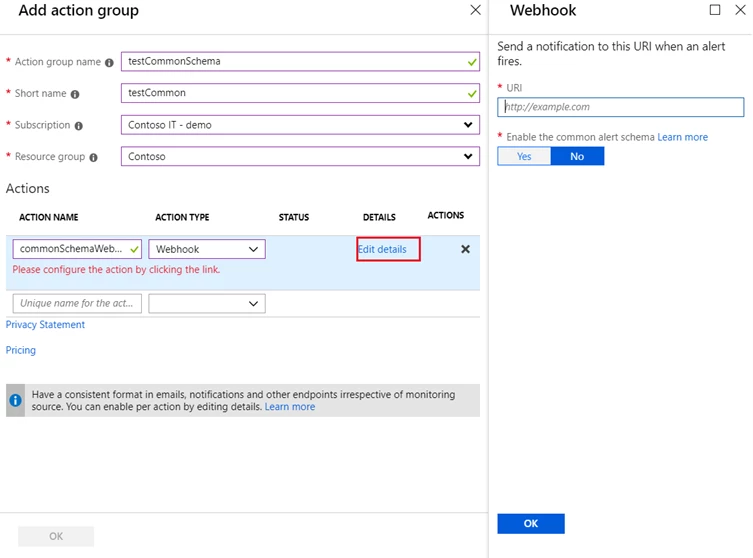
To opt-in or out from the Azure portal:
- Open any existing or a new action in an action group.
- Select Yes for the toggle to enable the common alert schema as shown.
If you wish to opt-in at scale, you can also use the action groups API to automate this process. Learn more about how to write integrations for the common alert schema and the alert context schemas for the different alert types.
As always, we would love to hear your feedback. Please continue to share your thoughts at azurealertsfeedback@microsoft.com






