I am delighted to announce the public preview of our latest security development from the Microsoft SQL product team, the new SQL Vulnerability Assessment (VA). SQL Vulnerability Assessment is your one-stop-shop to discover, track, and remediate potential database vulnerabilities. The VA preview is now available for Azure SQL Database and for on-premises SQL Server, offering you a virtual database security expert at your fingertips.
What is VA?
SQL Vulnerability Assessment (VA) is a new service that provides you with visibility into your security state, and includes actionable steps to investigate, manage, and resolve security issues and enhance your database fortifications. It is designed to be usable for non-security-experts. Getting started and seeing an initial actionable report takes only a few seconds.
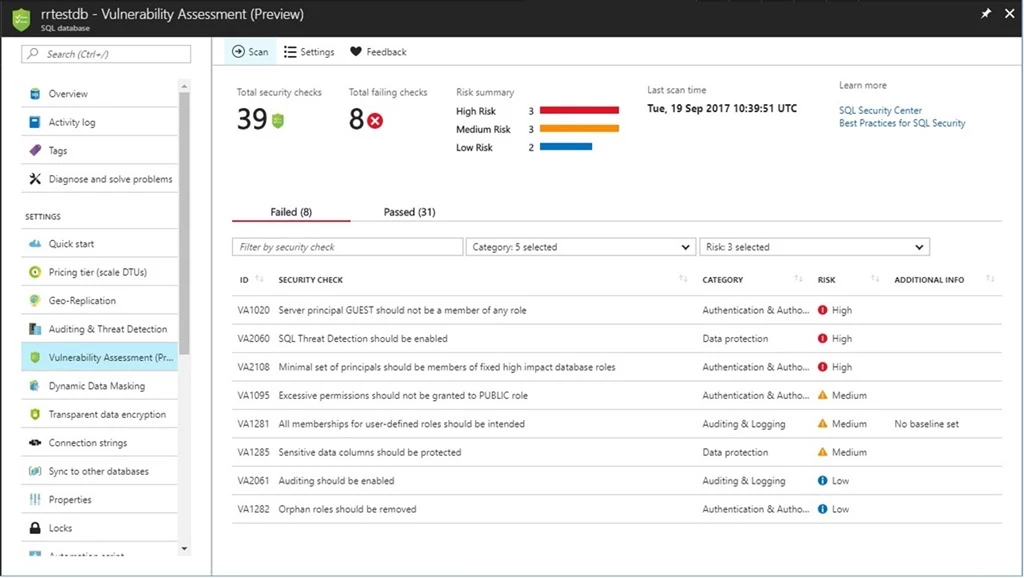
Vulnerability Assessment report in the Azure portal.
This service truly enables you to focus your attention on the highest impact actions you can take to proactively improve your database security stature! In addition, if you have data privacy requirements, or need to comply with data protection regulations like the EU GDPR, then VA is your built-in solution to simplify these processes and monitor your database protection status. For dynamic database environments where changes are frequent and hard to track, VA is invaluable in detecting the settings that can leave your database vulnerable to attack.
VA offers a scanning service built into the Azure SQL Database service itself, and is also available via SQL Server Management Studio (SSMS) for scanning SQL Server databases. The service employs a knowledge base of rules that flag security vulnerabilities and deviations from best practices, such as misconfigurations, excessive permissions, and exposed sensitive data. The rule base is founded on intelligence accrued from analyzing millions of databases, and extracting the security issues that present the biggest risks to your database and its valuable data. These rules also represent a set of requirements from various regulatory bodies to meet their compliance standards, which can contribute to compliance efforts. The rule base grows and evolves over time, to reflect the latest security best practices recommended by Microsoft.
Results of the assessment include actionable steps to resolve each issue and provide customized remediation scripts where applicable. An assessment report can be customized for each customer environment and tailored to specific requirements. This process is managed by defining a security baseline for the assessment results, such that only deviations from the custom baseline are reported.
How does VA work?
We designed VA with simplicity in mind. All you need to do is to run a scan, which will scan your database for vulnerabilities. The scan is lightweight and safe. It takes a few seconds to run, and is entirely read-only. It does not make any changes to your database!
When your scan is complete, your scan report will be automatically displayed in the Azure Portal or in the SSMS pane:
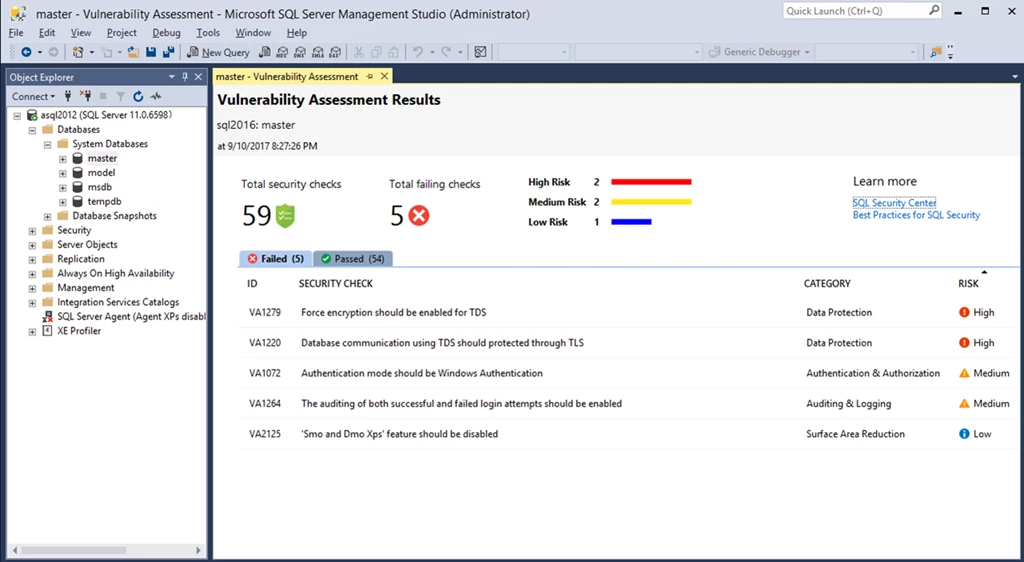
Vulnerability Assessment report in SSMS. Currently available in limited preview.
The scan results include an overview of your security state, and details about each security issue found. You will find warnings on deviations from security best practices, as well as a snapshot of your security-related settings, such as database principals and roles, and their associated permissions. In addition, scan results provide a map of sensitive data discovered in your database with recommendations of the built-in methods available to protect it.
For all the issues found, you can view details on the impact of the finding, and you will find actionable remediation information to directly resolve the issue. VA will focus your attention on security issues relevant to you, as your security baseline ensures that you are seeing relevant results customized to your environment. See “Getting Started with Vulnerability Assessment” for more details.
You can now use VA to monitor that your database maintains a high level of security at all times, and that your organizational policies are met. In addition, if your organization needs to meet regulatory requirements, VA reports can be helpful to facilitate the compliance process.
Get started today!
We encourage you to try out Vulnerability Assessment today, and start proactively improving your database security stature. Track and monitor your database security settings, so that you never again lose visibility and control of potential risks to the safety of your data.
Check out “Getting Started with Vulnerability Assessment” for more details on how to run and manage your assessment.
Try it out, and let us know what you think!