In Azure Automation, runbook authoring is typically done in the Azure portal, using our browser-based experience. However, in experimenting with ways to improve our runbook authoring process, we developed a new, open-source tool for runbook authoring – the (take a deep breath) Azure Automation PowerShell ISE add-on!
This project has been in the works for a while and is already used by many of our customers. Now we think it’s finally ready for more exposure and usage. We built this experience because we observed two things:
- Our customers heavily use the PowerShell ISE when writing PowerShell
- They even use the PowerShell ISE when writing runbooks, copy/pasting back and forth with the portal or importing/exporting with the PowerShell cmdlets
So we thought, why not create an Azure Automation experience that builds on top of this powerful tool? If you’re interested in speeding up your runbook authoring process using tools you’re already familiar with, we hope you’ll give the Azure Automation PowerShell ISE add-on a try!
Installation
You can install the ISE add-on module from PowerShell Gallery with:
> Install-Module AzureAutomationAuthoringToolkit -Scope CurrentUser
Then, if you want the PowerShell ISE to always automatically load the add-on, run:
> Install-AzureAutomationIseAddOn
Otherwise, whenever you want to load the add-on, just run the following in the PowerShell ISE:
> Import-Module AzureAutomationAuthoringToolkit
The add-on will prompt you to update if a newer version becomes available.
Overview
When you load the add-on, it will appear on the right-hand side of the PowerShell ISE.
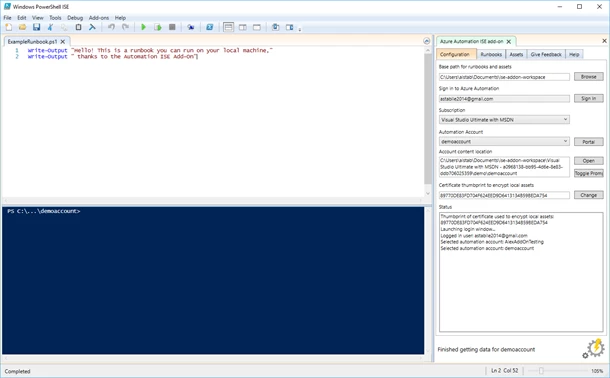
You can use it to view, edit and test the runbooks in your Automation Account; also to manage your Automation assets.
The Configuration tab (pictured above) is where you sign in to Azure and select the Automation account to work against. Its runbooks and assets are downloaded to the workspace folder specified at the top of this tab. For security, secret asset values (like encrypted variables and credential passwords) are not downloaded, but can be manually entered and securely stored locally – more details on that later.
Test runbooks on your local machine
When you install the add-on, it also provides cmdlets that emulate the standard Automation activities like Get-AutomationVariable, Get-AutomationPSCredential, Set-AutomationVariable, etc. Because your account’s assets get downloaded when you sign in, you can test your runbooks on your local machine before you test them in Automation!
Once you’ve done some local testing, you can also test your runbook in Azure Automation (or on any hybrid workers connected to your Automation Account) without leaving the ISE experience. For example:
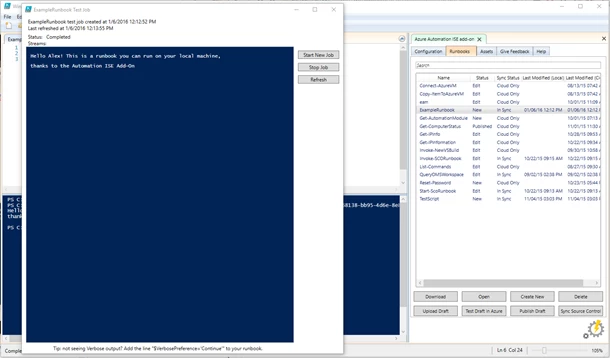
The new window shows information about a test job running in Azure Automation for this runbook. It’s the PowerShell ISE’s equivalent to the Test Job pane in Azure Automation.
Using encrypted assets
As mentioned above, secrets will still need to be entered manually. You can enter these values from the Assets tab. Assets missing values, such as an encrypted variable or a credential’s password field, will be highlighted in orange, as shown below.
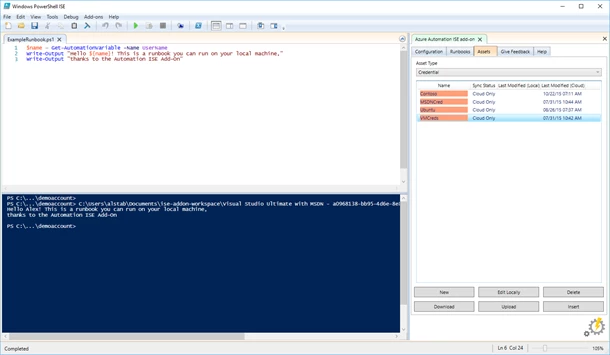
In this case, these credentials are highlighted because their password fields have not been set. Double-clicking a credential asset allows you to enter the desired value.
Asset values are stored on disk in your workspace in two files – one for non-encrypted assets and the other for encrypted assets. Encrypted asset values use a certificate, whose thumbprint is shown on the Configuration tab for encryption and decryption at runtime. You can also select your own certificate to use for encryption.
Contribute
This project is open-source and we are happy to review your pull requests if you have new ideas to improve the ISE add-on (shout out to Matt McNabb for being the first external contributor!). The project is hosted on Azure Automation’s GitHub.
If you’re interested in developing your own apps for Azure Automation, the project also serves as a great example of how to use our C# SDK.
Feedback
Let us know what you think! If you discover any issues or have any feature requests, you can file them on GitHub.
You can also submit feedback using the Feedback tab in the ISE add-on itself.
Summary
We’ve already heard from many users that this tool is extremely helpful to their runbook development process. We hope you’ll try it out and let us know about your experience so we can continue to refine it.
Happy automating!
Just getting started with Azure Automation? Learn about the service here and follow Azure Automation on Twitter for the latest updates.