Serverless and PaaS are all about unleashing developer productivity by reducing the management burden and allowing you to focus on what matters most, your application logic. That can’t come at the cost of security, though, and it needs to be easy to achieve best practices. Fortunately, we have a whole host of capabilities in the App Service and Azure Functions platform that dramatically reduce the burden of securing your apps.
Today, we’re announcing new security features which reduce the amount of code you need in order to work with identities and secrets under management. These include:
- Key Vault references for Application Settings (public preview)
- User-assigned managed identities (public preview)
- Managed identities for App Service on Linux/Web App for Containers (public preview)
- ClaimsPrincipal binding data for Azure Functions
- Support for Access-Control-Allow-Credentials in CORS config
We’re also continuing to invest in Azure Security Center as a primary hub for security across your Azure resources, as it offers a fantastic way to catch and resolve configuration vulnerabilities, limit your exposure to threats, or detect attacks so you can respond to them. For example, you may think you’ve restricted all your apps to HTTPS-only, but Security Center will help you make absolutely sure. If you haven’t already, be sure to give it a try.
So, without any further ado, let’s talk about the details of these new features!
Key Vault references for Application Settings (public preview)
At Microsoft Ignite 2018, we gave a sneak peek of a new feature that would allow apps to source their application settings from Key Vault. I’m incredibly pleased to announce that as of today, this feature is available in public preview!
More and more organizations are moving to secure secrets management policies, which is fantastic to see. Azure Key Vault gives you one source of truth for your secrets, with full control over access policies and audit history. While the existing Application Settings feature of App Service and Azure Functions is considered secure, with secrets encrypted at rest, it doesn’t provide these management capabilities that you may need.
However, working with Key Vault traditionally requires you to write some new code. We’ve found that many teams can’t easily update every place their application works with secrets, particularly in legacy applications. Azure Functions triggers are also an issue, as they are managed by the platform. Both of these scenarios are addressed with this new feature.
Sourcing Application Settings from Key Vault
The Key Vault references feature makes it so that your app can work as if it were using App Settings as they have been, meaning no code changes are required. You can get all of the details from our Key Vault reference documentation, but I’ll outline the basics here.
This feature requires a system-assigned managed identity for your app. Later in this post I’ll be talking about user-assigned identities, but we’re keeping these previews separate for now.
You’ll then need to configure an access policy on your Key Vault which gives your application the GET permission for secrets. Learn how to configure an access policy.
Lastly, set the value of any application setting to a reference of the following format:
@Microsoft.KeyVault(SecretUri=secret_uri_with_version)
Where secret_uri_with_version is the full URI for a secret in Key Vault. For example, this would be something like: https://myvault.vault.azure.net/secrets/mysecret/ec96f02080254f109c51a1f14cdb1931
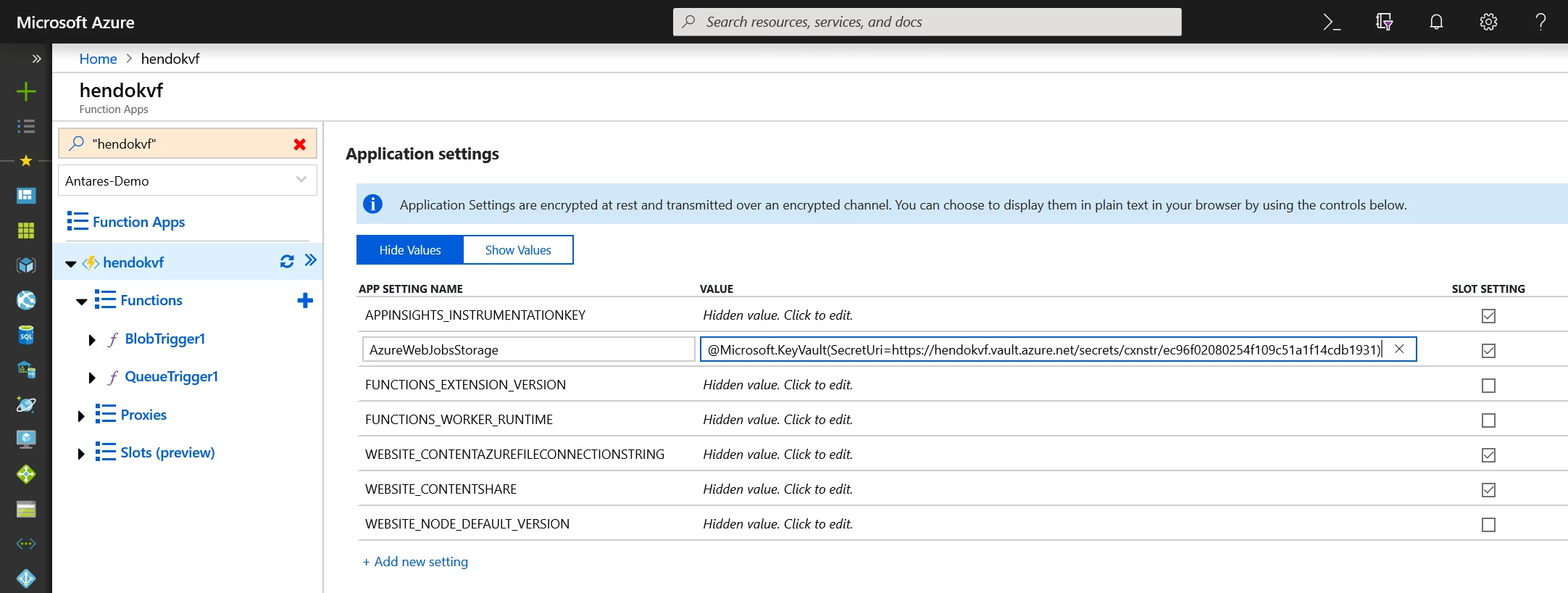
That’s it! No changes to your code required!
For this initial preview, you need to explicitly set a secret version, as we don’t yet have built-in rotation handling. This is something we look forward to making available as soon as we can.
User-assigned managed identities (public preview)
Our existing support for managed identities is called system-assigned. The idea is that the identity is created by the platform for a specific application and is tied to the lifecycle of the application. If you delete the application, the identity is removed from Azure Active Directory immediately.
Today we’re previewing user-assigned identities, which are created as their own Azure resource and then assigned to a given application. A user-assigned identity can also be assigned to multiple applications, and an application can have multiple user-assigned identities.
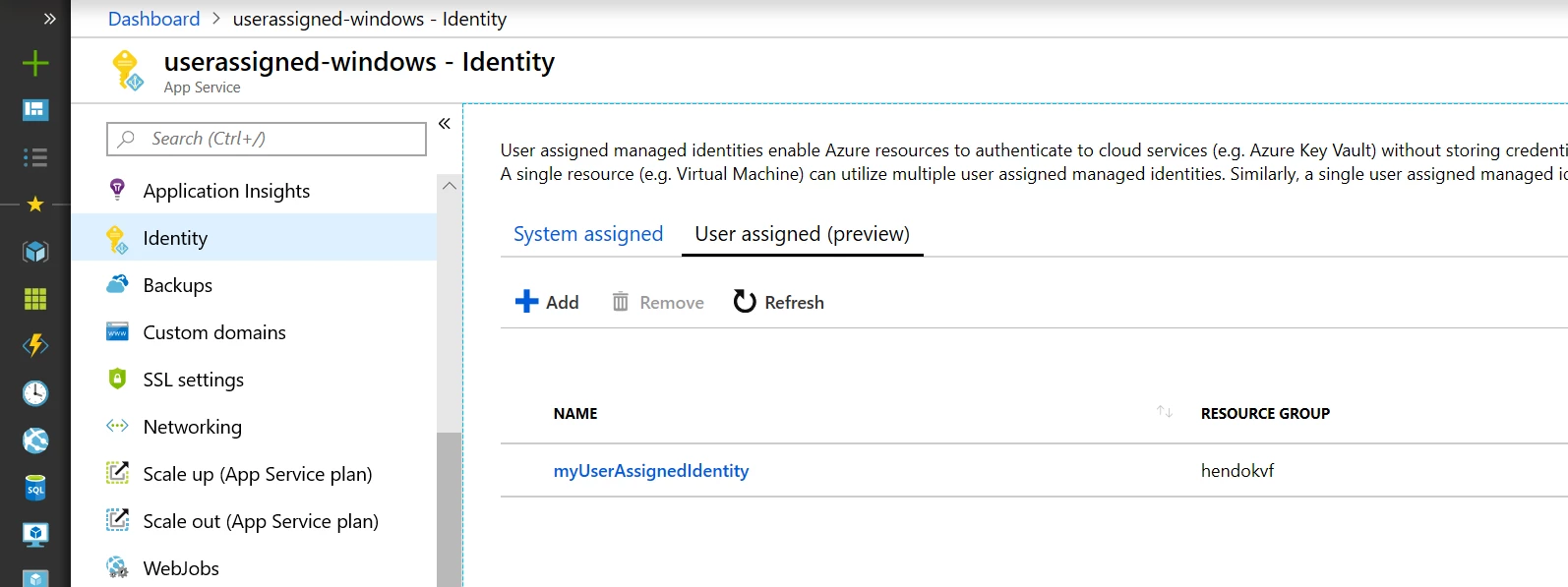
To learn about creating and using a user-assigned identity see, “Create, list, delete or assign a role to a user-assigned managed identity using the Azure portal.” Once you have created the identity, you can assign it to your app by updating your app configuration with a pointer to that identity. You can learn more about this in our managed identity documentation. Please note that this preview is not supported in sovereign clouds.
Quick tip: Although you can use an identity for multiple resources, be careful not to over-share identities and leak permissions to resources that don’t need them. Always keep the principle of least privilege in mind, and default to creating separate identities for each component of your application. Only share if truly necessary.
Managed identities for App Service on Linux/Web App for Containers (public preview)
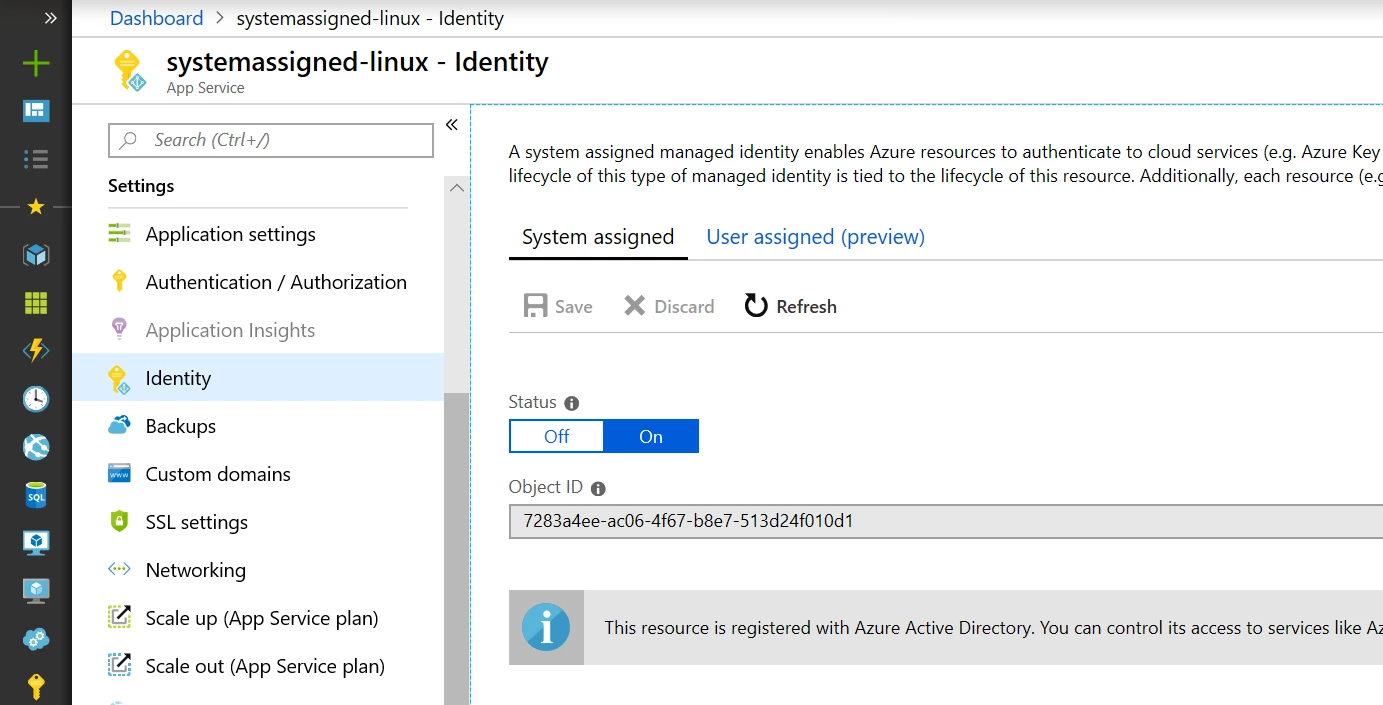
We’re also pleased to expand our support for managed identities to App Service on Linux/Web App for Containers. Now, Linux apps can have the same great experience of turnkey service-to-service authentication without having to manage any credentials. This preview includes both system-assigned and user-assigned support. In addition to a token service that makes it easy to request access to resources like Key Vault and Azure Resource Manager, this new support also gives Linux apps access to the Key Vault references feature mentioned before.
To get started with your Linux applications, you can follow the configuration steps in the documentation, “How to use managed identities for App Service and Azure Functions.”
ClaimsPrincipal binding data for Azure Functions
Since the first preview of Azure Functions, you’ve been able to use App Service Authentication/Authorization to limit access to your function apps. Today we’re making it easier to leverage incoming identities from your function code. This is currently finishing deployment it will be available to all function apps in Azure by the end of the week.
For .NET, this is exposed as a ClaimsPrincipal object, similar to what you’d see in ASP.NET. The object will be automatically injected if you add a ClaimsPrincipal object to your function signature, similar to how ILogger is injected.
using System.Net;
using Microsoft.AspNetCore.Mvc;
using System.Security.Claims;

public static IActionResult Run(HttpRequest req, ClaimsPrincipal principal, ILogger log)
{
     // ...
     return new OkResult();
}
Other languages will be able to access the same through the context object in an upcoming update. Until then, this is a .NET-only preview. To learn more about this capability, see our HTTP trigger reference.
I really love how this cleans up identity-dependent functions. This feature, in combination with the token binding, removes a nice bit of code that isn’t core to your business logic.
Support for Access-Control-Allow-Credentials in CORS config
Last, but not least, we have a quick update to our CORS feature which enables the Access-Control-Allow-Credentials header to be set. This is necessary whenever you need to send cookies or a token as part of calling your API. Without this response header being set, the browser will not pass data along.
You can find out more about the CORS feature and this new setting in the tutorial, “Host a RESTful API with CORS in Azure App Service.” To enable the header, you’ll just need to update your CORS config to set “supportCredentials” to true.
The Access-Control-Allow-Credentials header can also be enabled in the local Functions host for development purposes, thanks to a fantastic community pull request.
Wrapping up
As with all of our previews, we’d love for you to try these features out and let us know what you think!
If you have any requests for new features, please create an idea on our UserVoice (either for Functions or App Service). For any Functions-specific issues, please file an issue on our GitHub repo. You can also reach the team on Twitter @AzureFunctions.
We’re really looking forward to hearing from you and continuing the conversation. Now go secure those apps!