Previously, we announced the public preview release of Gateway Load Balancer (GWLB), a new SKU of Azure Load Balancer targeted for transparent NVA (network virtual appliance) insertion supported by a growing list of NVA providers. Today, placing NVAs in the path of traffic is a growing need for customers as their workloads scale. Common use cases of NVAs we’ve seen are:
- Allowing or blocking specific IPs using virtual firewalls.
- Protecting applications from DDoS attacks.
- Analyzing or visualizing traffic patterns.
And GWLB now offers the following benefits for NVA scenarios:
- Source IP preservation.
- Flow symmetry.
- Lightweight NVA management at scale.
- Auto-scaling with Azure Virtual Machines Scale Sets (VMSS).
With GWLB, bump-in-the-wire service chaining becomes easy to add on to new or existing architectures in Azure. This means customers can easily “chain” a new GWLB resource to both Standard Public Load Balancers and individual virtual machines with Standard Public IPs, covering scenarios involving both highly available, zonally resilient deployments and simpler workloads.
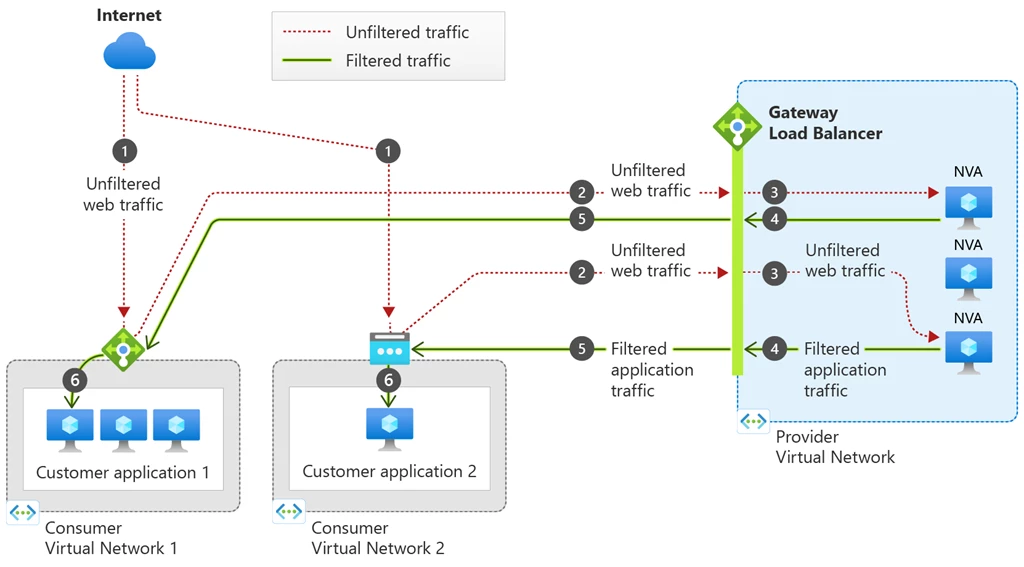
Figure 1: GWLB can be associated to multiple consumer resources, including both Standard Public Load Balancers and Virtual Machines with Standard Public IPs. When GWLB is chained to the front-end configuration or VM NIC IP configuration, unfiltered traffic from the internet will first be directed to the GWLB and then reach the configured NVAs. The NVAs will then inspect the traffic and send the filtered traffic to the final destination, the consumer application hosted on either the load balancer or virtual machine.
What’s new with Gateway Load Balancer
GWLB borrows a majority of the same concepts as the Standard Load Balancers that customers are familiar with today. You’ll have most of the same components such as frontend IPs, load balancing rules, backend pools, health probes, and metrics, but you’ll also see a new component unique to GWLB—VXLAN tunnel interfaces.
VXLAN is an encapsulation protocol utilized by GWLB. This allows traffic packets to be encapsulated and decapsulated with VXLAN headers as they traverse the appropriate data path, all while maintaining their original source IP and flow symmetry without requiring Source Network Address Translation (SNAT) or other complex configurations like user-defined routes (UDRs).
The VXLAN tunnel interfaces are configured as part of the GWLB’s back-end pool and enable the NVAs to isolate “untrusted” traffic from “trusted” traffic. Tunnel interfaces can either be internal or external and each backend pool can have up to two tunnel interfaces. Typically, the external interface is used for “untrusted” traffic—traffic coming from the internet and headed to the appliance. Correspondingly, the internal interface is used for “trusted” traffic—traffic going from your appliances to your application.
Contoso case study
To better understand the use case of GWLB, let’s dive deeper into example retail company Contoso’s use case.
Who is Contoso?
Contoso is a retail company that uses Azure Load Balancer today to make their web servers supporting their retail platform regionally resilient. In the past few years, they’ve experienced exponential growth and now serve over 20 million visitors per month. When faced with the need to scale their retail platform, they chose Azure Load Balancer because of its high performance coupled with ultra-low latency. As a result of their success, they’ve begun to adopt stricter security practices to protect customer transactions and reduce the risk of harmful traffic reaching their platforms.
What does Contoso’s architecture look like today?
One of their load balancers supporting the eastus region is called contoso-eastus and has a front-end IP configuration with the public IP 101.22.462. Today, traffic headed to 101.22.462 on port 80 is distributed to the backend instances on port 80 as well.
What’s the problem?
The security team recently identified some potentially malicious IP addresses that have been attempting to access their retail platform. As a result, they’re looking to place a network-layer virtual firewall to protect their applications from IP addresses with poor reputations.
What’s the plan?
Contoso has decided to go with a third-party NVA vendor whose appliances the team has used in other contexts such as smaller scale applications or other internal-facing tools. The security team wants to keep the creation of additional resources to a minimum to simplify their NVA management architecture, so they decide map one GWLB with an auto-scaling backend pool of NVAs using Azure VMSS to each group of load balancers deployed in the same region.
Deploying Gateway Load Balancer
The cloud infrastructure team at Contoso creates a GWLB with their NVAs deployed using Azure VMSS. Then, they chain this GWLB to their 5 Standard Public LBs for the eastus region. After verifying that their Data Path Availability and Health Probe Status metrics are 100 percent on both their GWLB and on each chained Standard Public LB, they run a quick packet capture to ensure everything is working as expected.
What happens now?
Now, traffic packets whose destination are any of the frontend IPs of the Standard Public LBs for eastus will be encapsulated using VXLAN and sent to the GWLB first. At this point, the firewall NVAs will decapsulate the traffic, inspect the source IP, and determine whether this traffic is safe to continue on towards the end application. The NVA will then re-encapsulate traffic packets that meet the firewall’s criteria and send it back to the Standard LB. When the traffic reaches the Standard LB, the packets will be decapsulated, meaning that the traffic will appear as if it came directly from the internet, with its original source IP intact. This is what we mean by transparent NVA insertion, as Contoso’s retail platform applications will behave exactly as they did before, without ever knowing that the packet was inspected or filtered by a firewall appliance prior to reaching the application server.
Gateway Load Balancer partners
Gateway Load Balancer supports a variety of NVA providers, you can learn more about each of our partners on our partners page.
Virtual firewalls
- Check Point
- Cisco
- F5
- Fortinet
- Palo Alto Networks
Traffic observability
- cPacket Networks
- Glasnostic
Network security
- Citrix
- Trend Micro
- Valtix
DDoS protection
- A10 Networks
Learn more
Try out Gateway Load Balancer today with the help of our quickstart tutorials, or read more about Gateway Load Balancer on our public documentation.