The IT industry is experiencing a shift from monolithic applications to microservices-based architectures. The benefits of this new approach include:
- Independent development and freedom to choose technology – Developers can work on different microservices at the same time and choose the best technologies for the problem they are solving.
- Independent deployment and release cycle – Microservices can be updated individually on their own schedule.
- Granular scaling – Individual microservices can scale independently, reducing the overall cost and increasing reliability.
- Simplicity – Smaller services are easier to understand which expedites development, testing, debugging, and launching a product.
- Fault isolation – Failure of a microservice does not have to translate into failure of other services.
In this blog post we will explore:
- How to design a simplified online store system to realize the above benefits.
- Why and how to manage public facing APIs in microservice-based architectures.
- How to get started with Azure API Management and microservices.
Example: Online store implemented with microservices
Let’s consider a simplified online store system. A visitor of the website needs to be able to see product’s details, place an order, review a placed order.
Whenever an order is placed, the system needs to process the order details and issue a shipping request. Based on user scenarios and business requirements, the system must have the following properties:
- Granular scaling – Viewing product details happens on average at least 1,000 times more often than placing an order.
- Simplicity – Independent user actions are clearly defined, and this separation needs to be reflected in the architecture of the system.
- Fault isolation – Failure of the shipping functionality cannot affect viewing products or placing an order.
They hint towards implementing the system with three microservices:
- Order with public GET and POST API – Responsible for viewing and placing an order.
- Product with public GET API – Responsible for viewing details of a product.
- Shipping triggered internally by an event – Responsible for processing and shipping an order.
For this purpose we will use Azure Functions, which are easy to implement and manage. Their event-driven nature means that they are executed on, and billed for, an interaction. This becomes useful when the store traffic is unpredictable. The underlying infrastructure scales down to zero in times of no traffic. It can also serve bursts of traffic in a scenario when a marketing campaign becomes viral or load increases during shopping holidays like Black Friday in the United States.
To maintain the scaling granularity, ensure simplicity, and keep release cycles independent, every microservice should be implemented in an individual Function App.
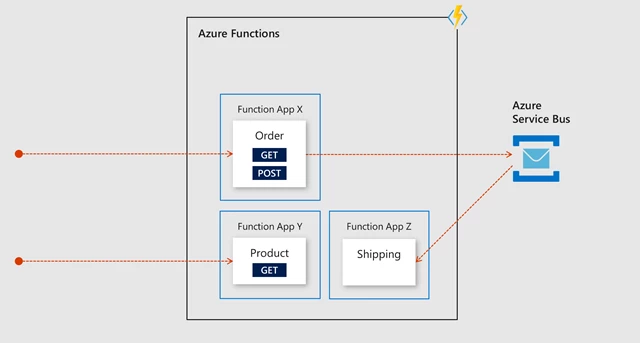
The order and product microservices are external facing functions with an HTTP Trigger. The shipping microservice is triggered indirectly by the order microservice, which creates a message in Azure Service Bus. For example, when you order an item, the website issues a POST Order API call which executes the order function. Next, your order is queued as a message in an Azure Service Bus instance which then triggers the shipping function for its processing.
Top reasons to manage external API communication in microservices-based architectures
The proposed architecture has a fundamental problem, the way communication from outside is handled.
- Client applications are coupled to internal microservices. This becomes especially burdensome when you wish to split, merge, or rewrite microservices.
- APIs are not surfaced under the same domain or IP address.
- Common API rules cannot be easily applied across microservices.
- Managing API changes and introducing new versions is difficult.
Although Azure Functions Proxies offer a unified API plane, they fall short in the other scenarios. The limitations should be addressed by fronting Azure Functions with an Azure API Management, now available in a serverless Consumption tier.
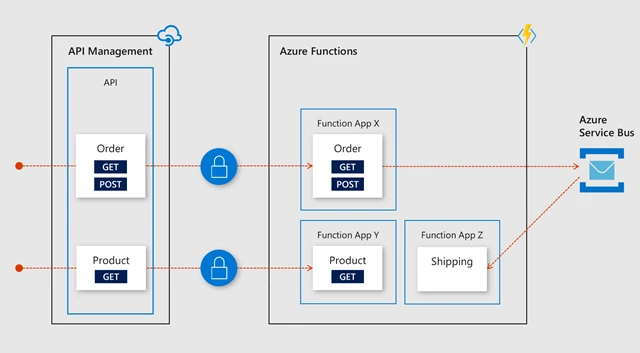
API Management abstracts APIs from their implementation and hosts them under the same domain or a static IP address. It allows you to decouple client applications from internal microservices. All your APIs in Azure API Management share a hostname and a static IP address. You may also assign custom domains.
Using API Management secures APIs by aggregating them in Azure API Management, and not exposing your microservices directly. This helps you reduce the surface area for a potential attack. You can authenticate API requests using a subscription key, JWT token, client certificate, or custom headers. Traffic may be filtered down only to trusted IP addresses.
With API Management can also execute rules on APIs. You can define API policies on incoming requests and outgoing responses globally, per API, or per API operation. There are almost 50 policies like authentication methods, throttling, caching, and transformations. Learn more by visiting our documentation, “API Management policies.”
API Management simplifies changing APIs. You can manage your APIs throughout their full lifecycle from design phase, to introducing new versions or revisions. Contrary to revisions, versions are expected to contain breaking changes such as removal of API operations or changes to authentication.
You can also monitor APIs when using API Management. You can see usage metrics in your Azure API Management instance. You may log API calls in Azure Application Insights to create charts, monitor live traffic, and simplify debugging.
API Management makes it easy to publish APIs to external developers. Azure API Management comes with a developer portal which is an automatically generated, fully customizable website where visitors can discover APIs, learn how to use them, try them out interactively, download their OpenAPI specification, and finally sign up to acquire API keys.
How to use API Management with microservices
Azure API Management has recently become available in a new pricing tier. With its billing per execution, the consumption tier is especially suited for microservice-based architectures and event-driven systems. For example, it would be a great choice for our hypothetical online store.
For more advanced systems, other tiers of API Management offer a richer feature set.
Regardless of the selected service tier, you can easily front your Azure Functions with an Azure API Management instance. It takes only a few minutes to get started with Azure API Management.