Skip to main content Explore View all products (200+) Microsoft Foundry Azure Copilot GitHub Copilot Azure Kubernetes Service (AKS) Azure Cosmos DB Azure Database for PostgreSQL Azure Arc Microsoft Fabric Linux virtual machines in Azure Foundry Models Foundry Agent Service Foundry IQ Foundry Tools Foundry Control Plane Observability in Foundry Control Plane Azure OpenAI in Foundry Models Azure Speech in Foundry Tools Azure Machine Learning View all databases Azure Cosmos DB Azure DocumentDB Azure SQL Azure Database for PostgreSQL Azure Managed Redis Microsoft Fabric Azure Databricks Linux virtual machines in Azure Windows Server on Azure Azure Functions Azure Virtual Machine Scale Sets Azure API Management Azure Container Apps Azure Kubernetes Service (AKS) Azure Kubernetes Fleet Manager Azure Container Registry Azure Red Hat OpenShift Azure Container Instances Azure Container Storage Azure Arc Azure Local Microsoft Defender for Cloud Azure Monitor Microsoft Sentinel Azure Migrate View all solutions (40+) Cloud solutions for small and medium businesses Cloud migration and modernization center Data analytics for AI Azure Databases AI apps and agents Microsoft Marketplace Microsoft Sovereign Cloud AI apps and agents Responsible AI with Azure AI Infrastructure Data analytics for AI Machine learning operations (MLOps) Low-code application development on Azure Integration Services Serverless computing DevOps Migration and modernization center .NET apps migration Databases on Azure Linux on Azure Oracle on Azure SAP on the Microsoft Cloud Adaptive cloud High-performance computing (HPC) Infrastructure as a service (IaaS) Resiliency Azure Essentials Frontier Accelerate for Azure FinOps on Azure Microsoft Marketplace Azure pricing overview Create an Azure account Free Azure services Flexible purchase options Pricing calculator FinOps on Azure Maximize ROI from AI Azure savings plans Azure reservations Azure Hybrid Benefit Virtual Machines Azure SQL Microsoft Foundry Microsoft Fabric Azure Kubernetes Service (AKS) Microsoft Defender for Cloud View more Software Development Companies Microsoft Marketplace Find a partner Resources for Azure partners Get started with Azure Customer stories Analyst reports, white papers, and e-books Videos Learn more about cloud computing Documentation Explore Azure portal Developer resources Quickstart templates Resources for startups Developer community Students Azure for partners Blog Events and Webinars Learn Support Contact Sales Get started with Azure Sign in

Last year at the //Build conference we launched the Azure Cloud Shell in the Azure portal, providing our users with a cloud-native command-line environment from any device, anywhere in the world. Over the last year, we've seen incredible adoption, with thousands of users logging in every day.

We've added some incredible integrations that make Cloud Shell even more powerful. We added automatic authorization for pre-installed open source tools like Terraform, Ansible, and InSpec. We've also partnered with other Microsoft teams to enable the Try It experiences for Azure and .NET documentation. Additionally, we worked with the Visual Studio Code team to embed Cloud Shell inside of Visual Studio Code and the Azure mobile app team to integrate Cloud Shell into the Azure mobile app for easy access from mobile devices everywhere.

Overall, the feedback we received from our active user base demonstrates the utility and value of Cloud Shell to our users. As we looked at the ways that people are using Cloud Shell, we realized early on that providing our users with easy-to-use choices for managing their cloud infrastructure via the web browser was critical to success.

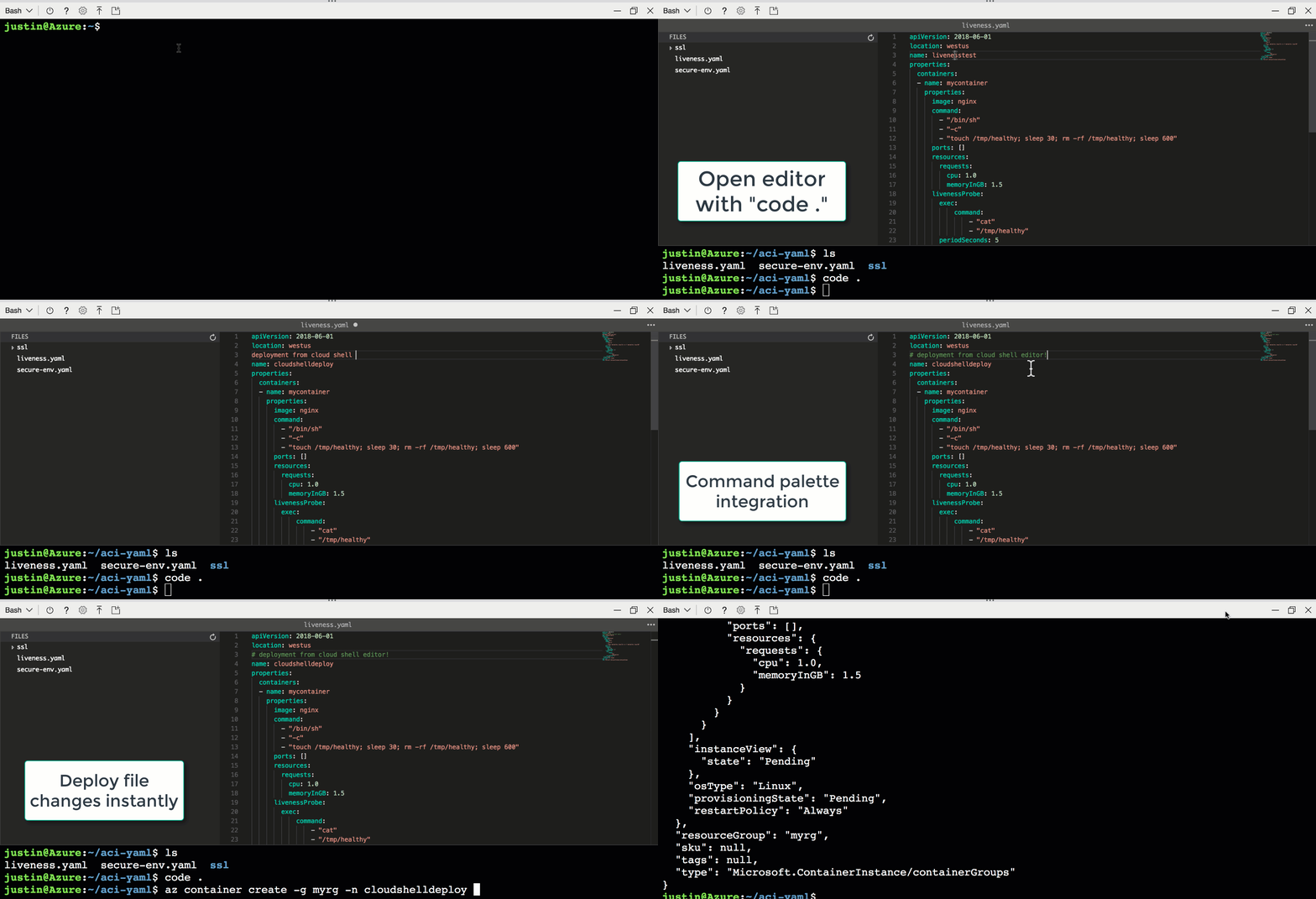
Since launch, we have provided a variety of editors (vi, emacs, nano) for editing files from Cloud Shell. To bring even more flexibility to how you edit files, today I'm excited to announce the launch of a graphical editor embedded directly in Azure Cloud Shell. Through collaboration with the Visual Studio Code team and their open-source Monaco project, the same web-standards based editor that powers Visual Studio Code is now integrated directly into Cloud Shell.
lznciJO

The Monaco code editor brings features like syntax coloring, auto completion, and code snippets. The new Cloud Shell integration includes a file explorer to easily navigate the Cloud Shell file system for seamless file exploration. This enables a rich editing workflow by simply typing “code .” to open the editor’s file explorer from any Cloud Shell web-based experience.


There's never been a better time to see how a cloud-based DevOps environment can radically change the ease and ubiquity of your interactions with the cloud. Try the new Cloud Shell editing experience today by navigating to shell.azure.com or portal.azure.com and typing “code .”!


WE ARE MICROSOFT

Explore Microsoft Foundry

The future of AI starts here. Envision your next great AI app with the latest technologies. Get started with Azure.