
We are pleased to announce the public preview of Microsoft Azure Analysis Services, the latest addition to our data platform in the cloud. Based on the proven analytics engine in SQL Server Analysis Services, Azure Analysis Services is an enterprise grade OLAP engine and BI modeling platform, offered as a fully managed platform-as-a-service (PaaS). Azure Analysis Services enables developers and BI professionals to create BI Semantic Models that can power highly interactive and rich analytical experiences in BI tools (such as Power BI and Excel) and custom applications.
Why Azure Analysis Services?
The success of any modern data-driven organization requires that information is available at the fingertips of every business user (not just IT professionals and data scientists) to guide their day-to-day decisions. Self-service BI tools have made huge strides in making data accessible to business users. However, most business users don’t have the expertise or desire to do the heavy lifting that is typically required to find the right sources of data, consume the raw data and transform it into the right shape, add business logic and metrics, and finally explore the data to derive insights. With Azure Analysis Services, a BI professional can create a semantic model over the raw data and share it with business users so that all they need to do is connect to the model and immediately explore the data and gain insights. Azure Analysis Services uses a highly optimized in-memory engine to provide responses to user queries at the “speed of thought”.
Fully managed platform-as-a-service
- Developers can create a server in seconds, choosing from the Developer (D1) or Standard (S1, S2, S4) service tiers. Each tier comes with fixed capacity in terms of query processing units and model cache. The developer tier (D1) supports up to 3GB model cache and the largest tier (S4) supports up to 100GB.
- The Standard tiers offer dedicated capacity for predictable performance and are recommended for production workloads. The Developer tier is recommended for proof-of-concept, development, and test workloads.
- Administrators can pause and resume the server at any time. No charges are incurred when the server is paused. We also plan to offer administrators the ability to scale up and down a server between the Standard tiers (not available currently).
- Developers can use Azure Active Directory to manage user identity and role based security for their models.
- The service is currently available in the South-Central US and West Europe regions. Check the Azure Products by Region page for the full list of currently available regions for Azure Analysis Services.
Compatible with SQL Server Analysis Services
- Developers can use SQL Server Data Tools in Visual Studio for creating models and deploying them to the service. Administrators can manage the models using SQL Server Management Studio and investigate issues using SQL Server Profiler.
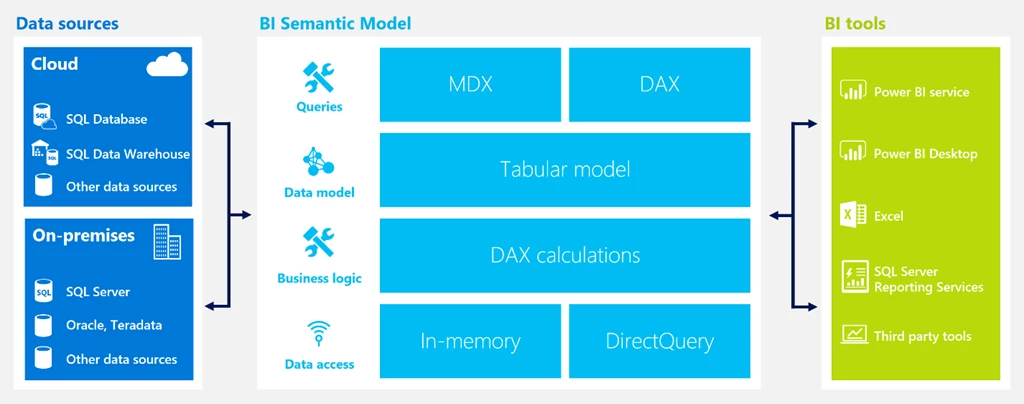
- Business users can consume the models in any major BI tool. Supported Microsoft tools include Power BI, Excel, and SQL Server Reporting Services. Other MDX compliant BI tools can also be used, after downloading and installing the latest drivers.
- The service currently supports tabular models (compatibility level 1200 only). Support for multidimensional models will be considered for a future release, based on customer demand.
- Models can consume data from a variety of sources in Azure (e.g. Azure SQL Database, Azure SQL Data Warehouse) and on-premises (e.g. SQL Server, Oracle, Teradata). Access to on-premises sources is made available through the on-premises data gateway.
- Models can be cached in a highly optimized in-memory engine to provide fast responses to interactive BI tools. Alternatively, models can query the source directly using DirectQuery, thereby leveraging the performance and scalability of the underlying database or big data engine.
Get started with the Azure Analysis Services preview by simply provisioning a resource in the Azure Portal or using Azure Resource Manager templates, and using that server name in your Visual Studio project. Use Azure Active Directory user names (UPNs) or groups in the role memberships for securing access to your models. Give it a try and let us know what you think.