Azure Container Registry announces dedicated data endpoints, enabling tightly scoped client firewall rules to specific registries, minimizing data exfiltration concerns.
Pulling content from a registry involves two endpoints:
- Registry endpoint, often referred to as the login URL, used for authentication and content discovery.
A command likedocker pull contoso.azurecr.io/hello-worldmakes a REST request which authenticates and negotiates the layers which represent the requested artifact. - Data endpoints serve blobs representing content layers.
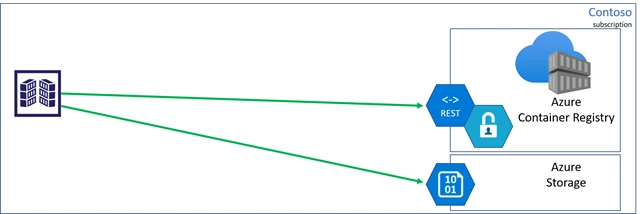
Registry managed storage accounts
Azure Container Registry is a multi-tenant service, where the data endpoint storage accounts are managed by the registry service. There are many benefits for managed storage, such as load balancing, contentious content splitting, multiple copies for higher concurrent content delivery, and multi-region support with geo-replication.
Azure Private Link virtual network support
Azure Container Registry recently announced Private Link support, enabling private endpoints from Azure Virtual Networks to be placed on the managed registry service. In this case, both the registry and data endpoints are accessible from within the virtual network, using private IPs.
The public endpoint can then be removed, securing the managed registry and storage accounts to access from within the virtual network.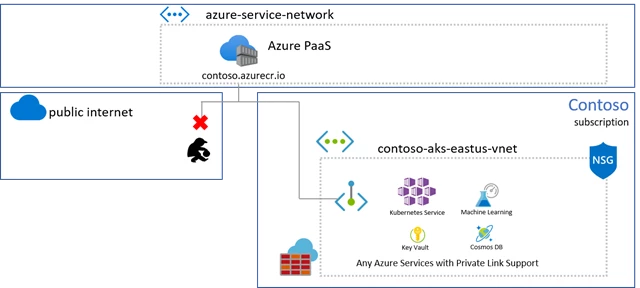
Unfortunately, virtual network connectivity isn’t always an option.
Client firewall rules and data exfiltration risks
When connecting to a registry from on-prem hosts, IoT devices, custom build agents, or when Private Link may not be an option, client firewall rules may be applied, limiting access to specific resources.
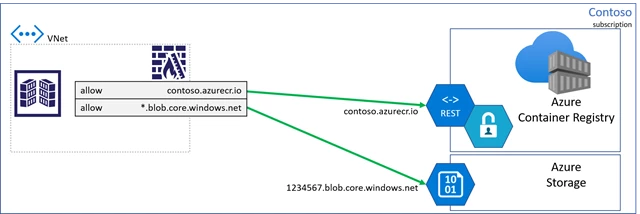
As customers locked down their client firewall configurations, they realized they must create a rule with a wildcard for all storage accounts, raising concerns for data-exfiltration. A bad actor could deploy code that would be capable of writing to their storage account.
To mitigate data-exfiltration concerns, Azure Container Registry is making dedicated data endpoints available.
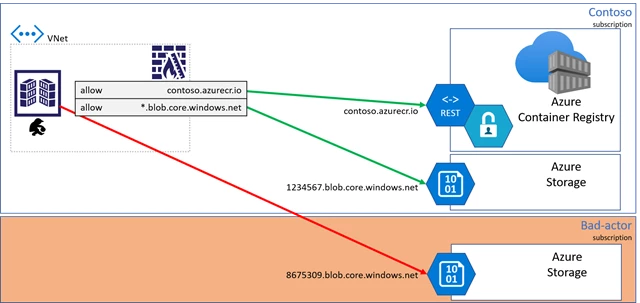
Dedicated data endpoints
When dedicated data endpoints are enabled, layers are retrieved from the Azure Container Registry service, with fully qualified domain names representing the registry domain. As any registry may become geo-replicated, a regional pattern is used:
[registry].[region].data.azurecr.io.
For the Contoso example, multiple regional data endpoints are added supporting the local region with a nearby replica.
With dedicated data endpoints, the bad actor is blocked from writing to other storage accounts.
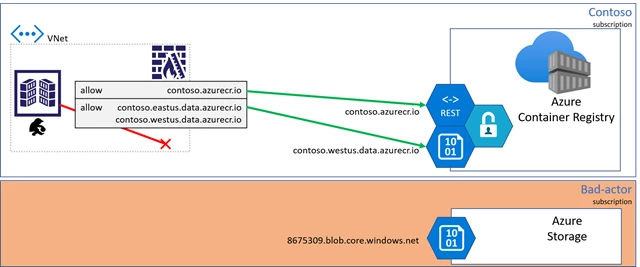
Enabling dedicated data endpoints
Note: Switching to dedicated data-endpoints will impact clients that have configured firewall access to the existing *.blob.core.windows.net endpoints, causing pull failures. To assure clients have consistent access, add the new data-endpoints to the client firewall rules. Once completed, existing registries can enable dedicated data-endpoints through the az cli.
Using az cli version 2.4.0 or greater, run the az acr update command:
az acr update --name contoso --data-endpoint-enabled
To view the data endpoints, including regional endpoints for geo-replicated registries, use the az acr show-endpoints cli:
az acr show-endpoints --name contoso
outputs:
{
  "loginServer": "contoso.azurecr.io",
  "dataEndpoints": [
    {
      "region": "eastus",
      "endpoint": "contoso.eastus.data.azurecr.io",
    },
    {
      "region": "westus",
      "endpoint": "contoso.westus.data.azurecr.io",
    }
  ]
}
Security with Azure Private Link
Azure Private Link is the most secure way to control network access between clients and the registry as network traffic is limited to the Azure Virtual Network, using private IPs. When Private Link isn’t an option, dedicated data endpoints can provide secure knowledge in what resources are accessible from each client.
Pricing information
Dedicated data endpoints are a feature of premium registries.
For more information on dedicated data endpoints, see the pricing information here.