This is the Trace Id: 6307c0db42e94fe3c982d547a0e60cd0
Skip to main content Explore View all products (200+) Microsoft Foundry Azure Copilot GitHub Copilot Azure Kubernetes Service (AKS) Azure Cosmos DB Azure Database for PostgreSQL Azure Arc Microsoft Fabric Linux virtual machines in Azure Foundry Models Foundry Agent Service Foundry IQ Foundry Tools Foundry Control Plane Observability in Foundry Control Plane Azure OpenAI in Foundry Models Azure Speech in Foundry Tools Azure Machine Learning View all databases Azure Cosmos DB Azure DocumentDB Azure SQL Azure Database for PostgreSQL Azure Managed Redis Microsoft Fabric Azure Databricks Linux virtual machines in Azure Windows Server on Azure Azure Functions Azure Virtual Machine Scale Sets Azure API Management Azure Container Apps Azure Kubernetes Service (AKS) Azure Kubernetes Fleet Manager Azure Container Registry Azure Red Hat OpenShift Azure Container Instances Azure Container Storage Azure Arc Azure Local Microsoft Defender for Cloud Azure Monitor Microsoft Sentinel Azure Migrate View all solutions (40+) Cloud solutions for small and medium businesses Cloud migration and modernization center Data analytics for AI Azure Databases AI apps and agents Microsoft Marketplace Microsoft Sovereign Cloud AI apps and agents Responsible AI with Azure AI Infrastructure Data analytics for AI Machine learning operations (MLOps) Low-code application development on Azure Integration Services Serverless computing DevOps Migration and modernization center .NET apps migration Databases on Azure Linux on Azure Oracle on Azure SAP on the Microsoft Cloud Adaptive cloud High-performance computing (HPC) Infrastructure as a service (IaaS) Resiliency Azure Essentials Frontier Accelerate for Azure FinOps on Azure Microsoft Marketplace Azure pricing overview Create an Azure account Free Azure services Flexible purchase options Pricing calculator FinOps on Azure Maximize ROI from AI Azure savings plans Azure reservations Azure Hybrid Benefit Virtual Machines Azure SQL Microsoft Foundry Microsoft Fabric Azure Kubernetes Service (AKS) Microsoft Defender for Cloud View more Software Development Companies Microsoft Marketplace Find a partner Resources for Azure partners Get started with Azure Customer stories Analyst reports, white papers, and e-books Videos Learn more about cloud computing Documentation Explore Azure portal Developer resources Quickstart templates Resources for startups Developer community Students Azure for partners Blog Events and Webinars Learn Support Contact Sales Get started with Azure Sign in

HashiCorp Terraform on Azure

Easily manage infrastructure as code using a familiar automation tool.
 

Simplify infrastructure management

Define infrastructure as code with declarative configuration files that can be used to create, manage, and update infrastructure resources, such as virtual machines (VMs), networks, and containers. Use the Terraform configuration language to easily automate resource management across your workflow.

Why Terraform on Azure?

Pre-integrated

Terraform is built into Azure Cloud Shell and authenticated to your subscription, so it’s integrated and ready to go. Build and test modules in Azure with the Azure Terraform extension for Visual Studio Code, providing Terraform command support, resource graph visualization, and Azure Cloud Shell integration directly within Visual Studio Code.

Community-led

Microsoft and HashiCorp engineering teams work together with the Terraform community to continually develop the Azure Terraform provider and modules. Join the GitHub repository to make feature requests, report issues, and contribute.

Enterprise-ready

Streamline operations and provision any infrastructure more securely and efficiently with Terraform Enterprise. Centralize infrastructure deployment within one workflow and provision, govern, and audit any environment.

Explore common Terraform on Azure scenarios

Create a Linux virtual machine.

Create a Kubernetes cluster.

Create a virtual machine scale set.

Configure a virtual network.

Example DevOps workflow with Terraform on Azure
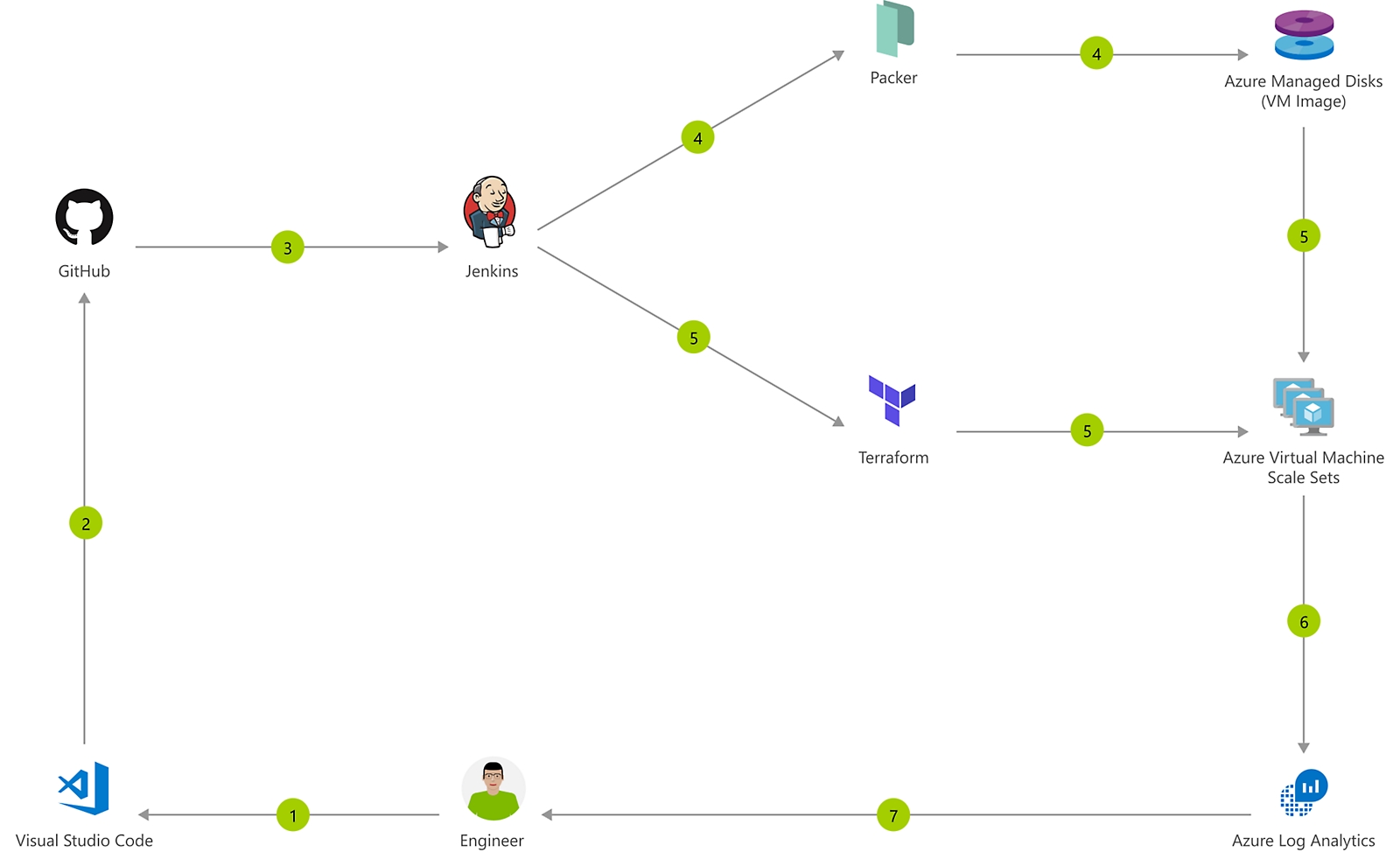
Immutable Infrastructure CI/CD using Jenkins and Terraform on Azure Virtual Architecture overview

Azure is a world-class cloud for hosting virtual machines running Windows or Linux. Whether you use Java, Node.js, Go, or PHP to develop your applications, you'll need a continuous integration and continuous deployment (CI/CD) pipeline to push changes to these virtual machines automatically.
 

Get started quickly

1

Create your Azure free account.

2

Install and configure Terraform.

3

Create a VM using Terraform.

Other HashiCorp solutions on Azure

HashiCorp Vault

Manage secrets and protect sensitive data across dynamic, distributed environments.
HashiCorp Consul

Connect, secure, and configure services across any runtime platform and public or private cloud.

Stay up-to-date with the Microsoft Open Source blog

Dig deeper—learn more about Terraform on Azure